Просмотр новости
Найдите то, что Вас интересует
 Спутники
 РН
РН SpaceX
 Роскосмос
 NASA
NASA
СпутникиРНSpaceXРоскосмосNASALearn how to provision Datadog on Stripe Projects, start a 14-day free trial, and manage billing through your existing Stripe account.
Stripe Projects reduces the manual work of setting up, managing, and paying for third-party SaaS solutions. You can now use it to get started with Datadog in just two commands:
stripe projects init
stripe projects add datadog/observability
If your Stripe account has a verified email address, running those commands in the Stripe CLI gives you a Datadog organization with a 14-day free trial and an automatically generated API key that is ready to use. You avoid email verification loops, tab-switching to copy an API key out of a dashboard, and lengthy sign-up forms. You don’t even have to open the Datadog UI.
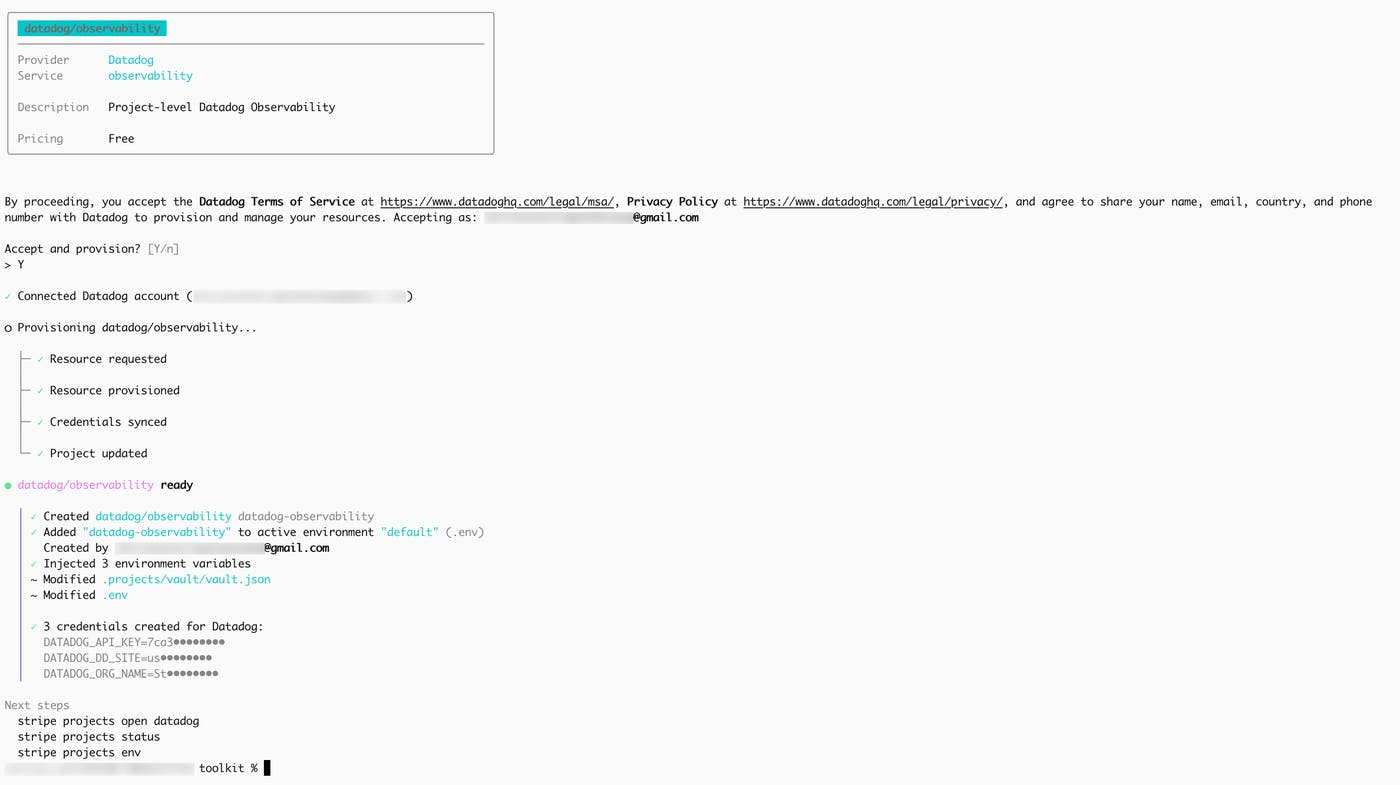
Stripe Projects, available in developer preview, is a CLI workflow for discovering, provisioning, and managing the services your app depends on. It’s like a package manager, but for provisioning your app stack.
Datadog collaborated with Stripe as a co-design and launch partner for the protocol that powers Stripe Projects. Here’s how Datadog appears in the catalog:
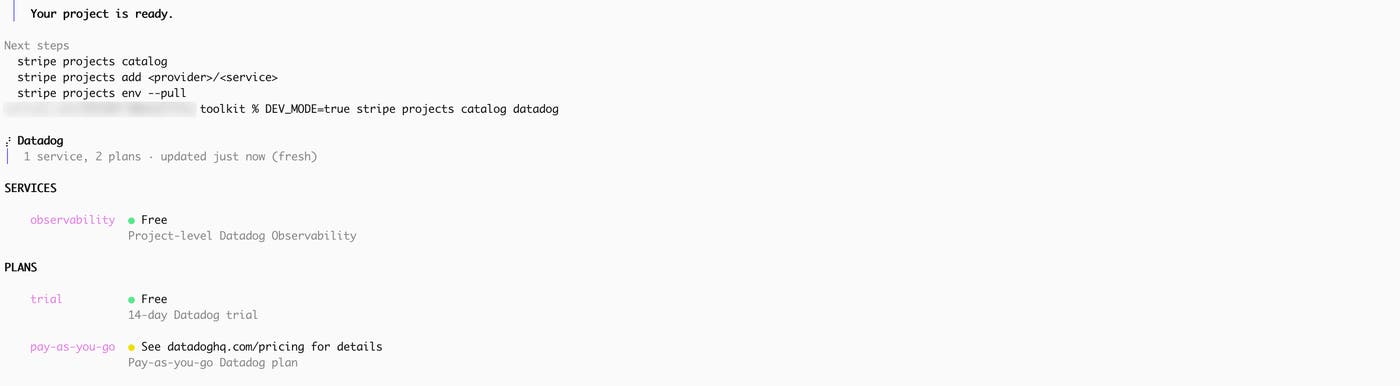
If you know Datadog, you know we have plenty of products to choose from. The decision about which products you use belongs in your code, not in a provisioning step. That’s why we shipped only one service, observability, for the Stripe Projects catalog instead of one service per product.
When you provision the service, you get a Datadog org and an API key that works across the entire Datadog platform. You can send logs today, add traces tomorrow, and monitor your AI agents when they’re ready in production. If you adopt more Datadog products, you don’t need to return to the catalog or re-provision anything.
Billing, without the billingBecause Stripe users have a shared payment token, you can go from the free trial to the pay-as-you-go plan in one command:
stripe projects upgrade datadog-observability
Or you can skip the trial and provision pay-as-you-go Datadog from the beginning:
stripe projects add datadog/pay-as-you-go
Either way, your existing Stripe payment method covers Datadog. There is no separate billing setup on the Datadog side, and you don’t have to enter credit card information or initiate a procurement process.
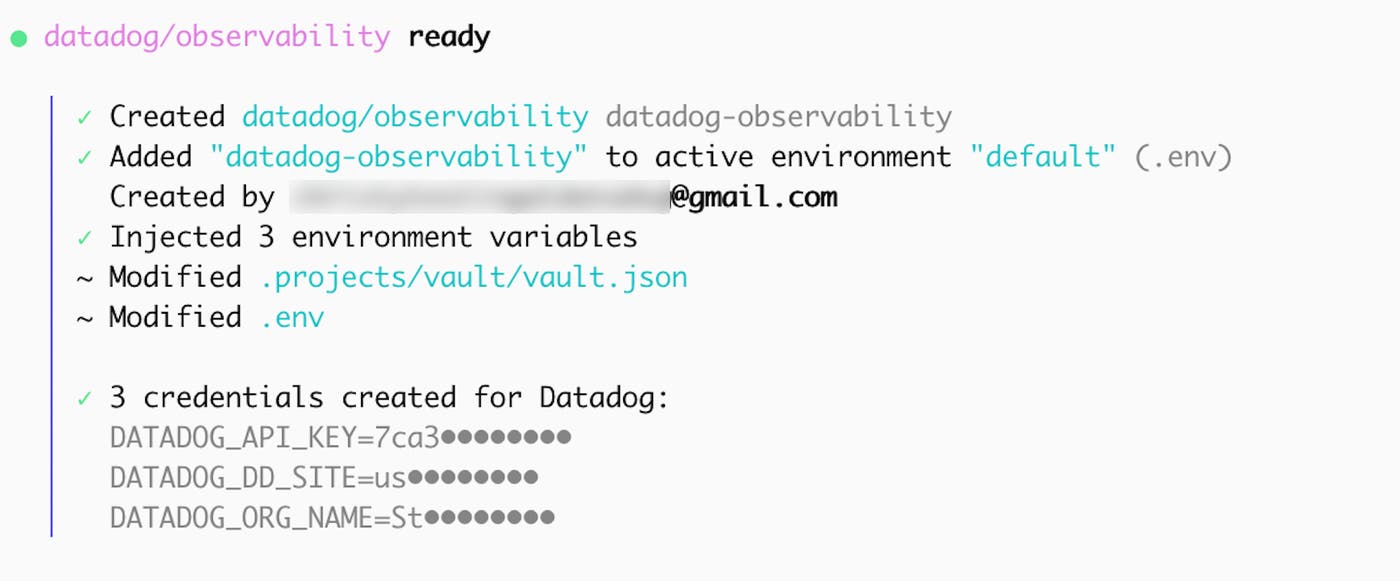
What lands in your Stripe projectAfter provisioning is complete, your .env file includes your Datadog API key, site, and organization name. These values provide the connection details that an SDK or the Datadog Agent uses to send data to your Datadog org.
Too many SaaS tools come with a shadow to-do list: create the account, verify the email address, add a payment method, figure out who owns the subscription, and remember that all of it exists at renewal time. It adds up to friction that can impact your technical decisions. Teams may end up choosing tools based on how many vendors they can tolerate managing rather than what they actually want to build with.
With Datadog on Stripe Projects, choosing your observability platform is like picking any other dependency. You enter one command after you’ve initialized Stripe Projects, you’re charged through your existing payment method, and your workflow (or your agent’s) never leaves the terminal.
Get started with Datadog on Stripe ProjectsDatadog on Stripe Projects makes it possible to provision Datadog from your terminal or with an agent and manage billing through the Stripe account that you’re already using. You can start a 14-day free trial without leaving the Stripe CLI. Once you’re ready, install the Stripe CLI and the Projects plugin, and then run the two commands:
stripe projects init
stripe projects add datadog/observability
To learn more about Stripe Projects, read the Stripe Projects documentation.
| # | Наименование новости | Тональность | Информативность | Дата публикации |
|---|---|---|---|---|
| 1 | Use OpenTelemetry-native observability with Datadog from ingestion to investigation | 0 | 17.47 | 20-07-2026 |
| 2 | Give your AI agents live Datadog access from the command line | 0 | 9.79 | 05-06-2026 |
| 3 | How we measure data completeness at scale | 0 | 6.52 | 01-07-2026 |
| 4 | Monitor Apigee X API traffic and security with Datadog | 0 | 4.98 | 15-07-2026 |
| 5 | Using Evaluation Frameworks with Agent Observability | 0 | 7.74 | 22-06-2026 |
| 6 | Prioritize security findings with the Datadog Runtime Prioritization Engine | 0 | 7.65 | 31-07-2026 |
| 7 | Three internal tools Datadog built with AI that improved developer experience and system performance | 0 | 7.06 | 01-07-2026 |
| 8 | A practical guide to React error monitoring | 0 | 7.06 | 29-07-2026 |
| 9 | Engineering the Datadog Agent for FedRAMP High® Certification | 0 | 7.26 | 28-07-2026 |
| 10 | Investigate every security event with an AI agent, without the frontier bill | 0 | 8.8 | 28-07-2026 |