Просмотр новости
Найдите то, что Вас интересует
 Спутники
 РН
РН SpaceX
 Роскосмос
 NASA
NASA
СпутникиРНSpaceXРоскосмосNASAKey Points Network Extension: Learn how to stretch Layer 2 networks from your legacy vSphere environment to VMware Cloud Foundation (VCF) 9.1, ensuring workloads retain their original IP and MAC addresses. Workload Migration: Understand the different HCX migration types available, with a step-by-step guide to perform your first migration. About This Series Part 1: Deploy … Continued
The post The Complete Guide to Workload Mobility with VMware Cloud Foundation Operations HCX 9.1 (Part 3: Extending Networks and Migrating Workloads) appeared first on VMware Blogs.
Disclaimer: It is important to note that this blog offers general recommendations, which may not apply to all scenarios or cover every aspect of deployment. For professional services, please engage Broadcom Professional Services.
Understanding HCX Migration TypesBefore migrating workloads, selecting the appropriate HCX migration type depends on the following main considerations:
For more information on each migration type and additional limitations, see the table below:
| Migration Type | Downtime | Parallel | Network Underlay Minimums | Additional Characteristics & Protocols |
|---|---|---|---|---|
| Cold Migration | Yes* | No | BW: 250 Mbps MTU: 1150 Loss: 0.1% Latency: 150 ms |
* Because this is a cold migration, the virtual machine starts in a powered off state and remains in the same state during the entire migration. |
| vMotion | No | No | BW: 150 Mbps (w/ Opt) BW: 250 Mbps (no Opt) MTU: 1150 Loss: 0.1% Latency: 150 ms |
|
| Bulk Migration | Yes* | Yes | BW: 50 Mbps MTU: 1150 Loss: 1.0% Latency: 150 ms |
* Minimum downtime occurs during the scheduled switchover window when the active VM is gracefully powered off at the source and the replica is powered on at the destination. |
| Replication Assisted vMotion (RAV) | No | Yes* | BW: 150 Mbps (w/ Opt) BW: 250 Mbps (no Opt) MTU: 1150 Loss: 0.1% Latency: 150 ms |
* Live switchover of concurrent RAV migrations is run serially per Service Mesh. |
| HCX Assisted vMotion (Direct) | No | No | BW: 250 Mbps MTU: 1500 Loss: 0.1% Latency: 150 ms |
|
| OS Assisted Migration (OSAM) | Yes | Yes | BW: 50 Mbps MTU: 1150 Loss: 1.0% Latency: 150 ms |
|
Legend: BW = Bandwidth | Opt = WAN Optimization appliance enabled
Blog Scope: The OS Assisted Migration (OSAM) method is designed for non-vSphere workloads (Hyper-V or KVM). However, this guide focuses exclusively on migrating from a legacy vCenter to a VCF 9.1 vCenter.
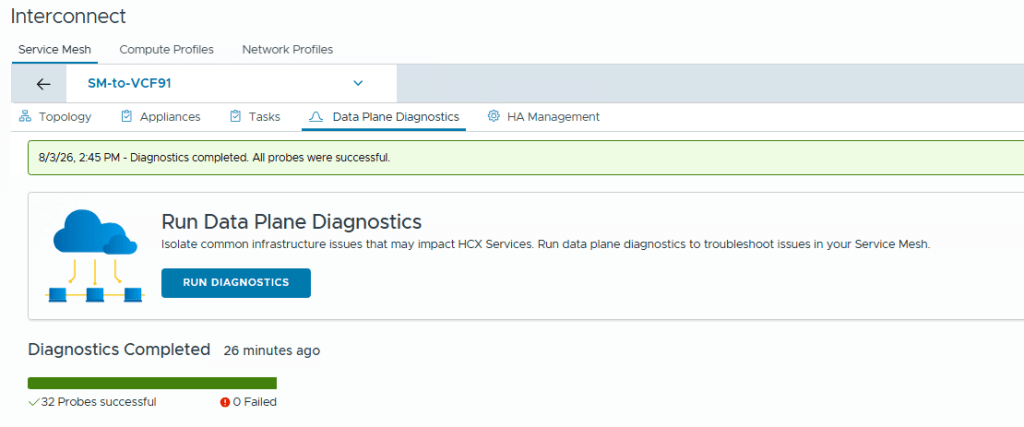
1. Pre-Migration Health ChecksBefore starting migrations, run HCX Diagnostics and Transport Analytics. Diagnostics verifies that required firewall ports are open, while Transport Analytics measures underlay bandwidth, latency, and packet loss. Completing these checks helps to identify issues and avoid unexpected failures during migration.
Step 1: Running HCX Diagnostics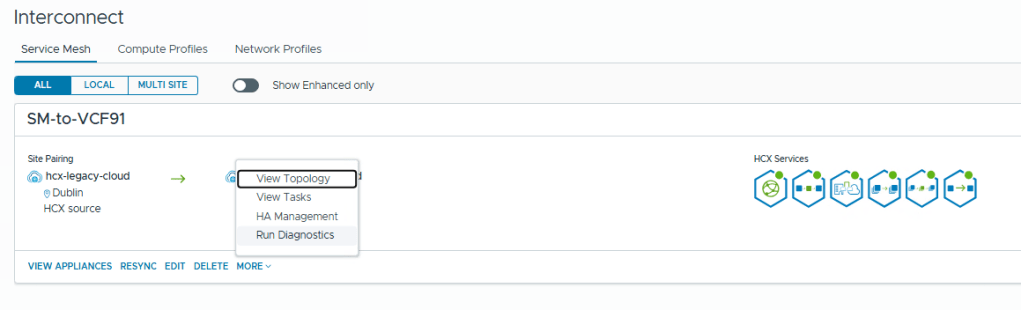
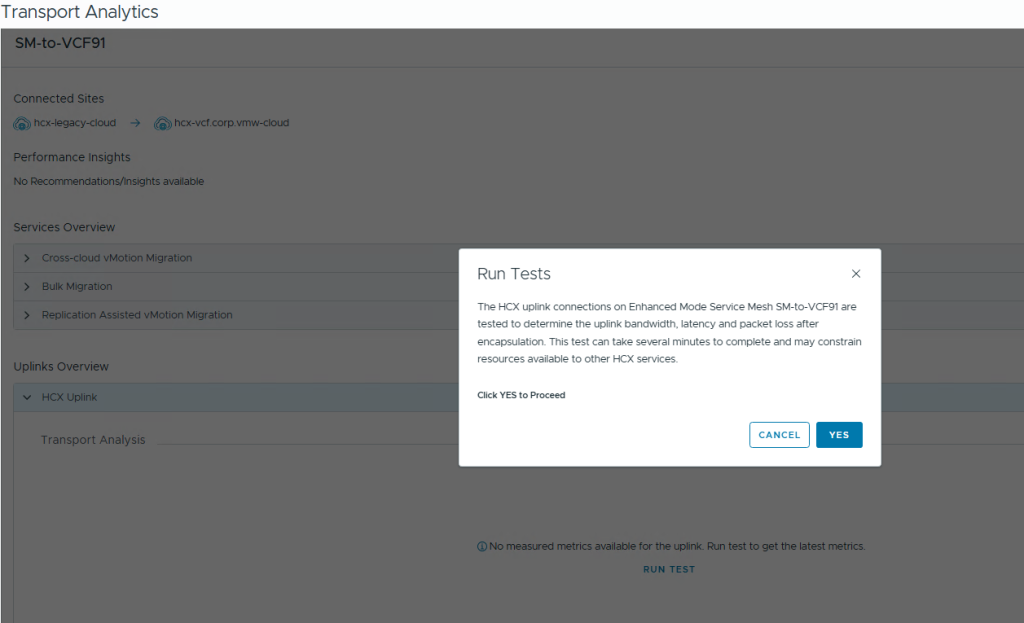
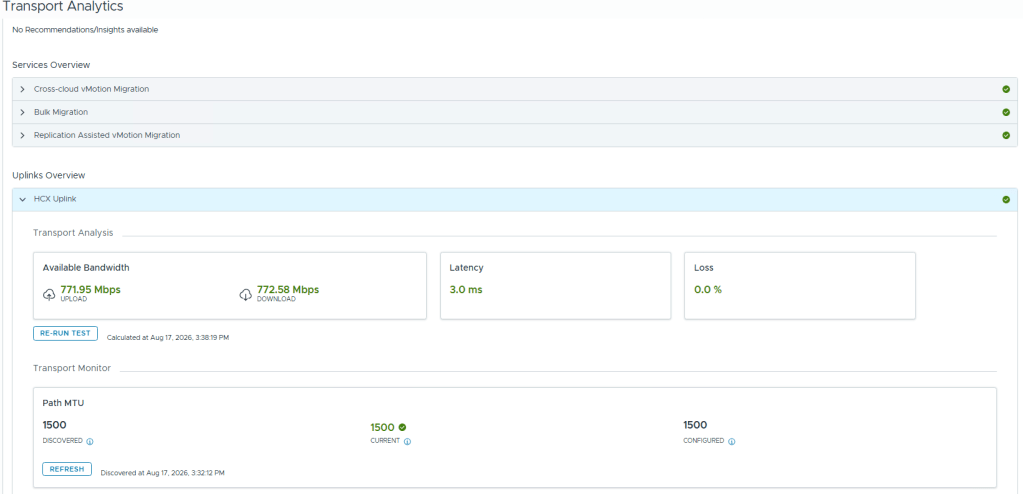
Extending Layer 2 networks allows workloads migrated to VMware Cloud Foundation (VCF) 9.1 to retain their original IP and MAC addresses, eliminating application re-IP requirements during migration. Follow these steps to stretch your source network across the HCX Service Mesh:
Reviewing Prerequisites & Supported TopologiesBefore proceeding, it is highly recommended to review the official documentation to ensure your environment configuration is fully supported:
When extending networks with HCX, keep the following supported network types in mind:
For comprehensive details, reference the official Broadcom guide on Extending Networks. Below is a simplified breakdown of the process:

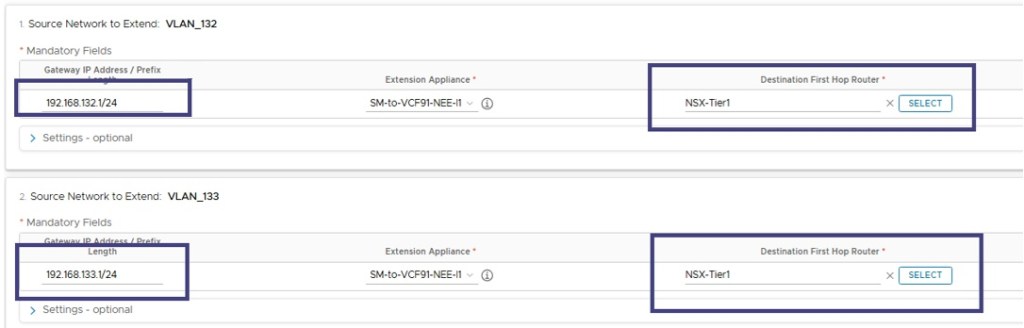
Now that your Layer 2 networks are successfully extended, the environment is ready to migrate virtual machines. Because the network is stretched, workloads will retain their original IP and MAC addresses upon moving to VCF 9.1. VCF Operations HCX orchestrates this process using Mobility Groups, allowing you to batch and manage multiple workloads at once. For detailed operational instructions, review the official guide on Migrating Virtual Machines using Mobility Groups.
Step-by-Step ConfigurationWarning: Be cautious when enabling Upgrade Virtual Hardware or Disable HCX Per-VM EVC. These settings can cause lock-in, preventing you from migrating the workload back to the legacy environment due to hardware or CPU instruction set incompatibilities.
This concludes our three-part series on VCF Operations HCX 9.1. From the initial deployment and Service Mesh configuration to extending Layer 2 networks and executing VM migrations, you now have the foundational steps to successfully transition your workloads to VCF 9.1.
Special thanks to Abhilash Kunhappan, Chris O’Sullivan (Support Domain Expert), Vipul Patel (HCX Engineering) and Jose Gonzalez Cobo (Product Management).
Subscribe to get the latest posts sent to your email.
| # | Наименование новости | Тональность | Информативность | Дата публикации |
|---|---|---|---|---|
| 1 | Managing VKS Clusters at Scale: Improvements in VCF 9.1 | 0 | 15.88 | 30-09-2026 |
| 2 | Navigating the AI Threat Era: Upgrading to VMware Cloud Foundation 9.1 and Applying Express Patches | 0 | 14.63 | 01-10-2026 |
| 3 | The Cost Case Is Clear: Infrastructure Economics with VMware vSphere Foundation 9.1 | 0 | 13.63 | 28-09-2026 |
| 4 | Optimizing AI Deployments with VMware Cloud Foundation (Part 2) | 0 | 13.71 | 28-09-2026 |
| 5 | One Namespace to Rule Them All: The New esxcli memtier Namespace | 0 | 13.62 | 25-09-2026 |
| 6 | VMware Explore on Tour 2026 | Season Recap | 0 | 15.75 | 30-09-2026 |
| 7 | Streamlining CI/CD on VMware vSphere Kubernetes Service with Harness, Wiz, Artifactory, Dynatrace and the VCF Secret Store | 0 | 13.3 | 30-09-2026 |
| 8 | Security Starts with Hardware | 0 | 18.76 | 02-10-2026 |
| 9 | BroadcomがサポートするKubernetes関連のOSSパッケージ (VKS アドオン) について | 0 | 24.14 | 01-10-2026 |