Просмотр новости
Найдите то, что Вас интересует
 Спутники
 РН
РН SpaceX
 Роскосмос
 NASA
NASA
СпутникиРНSpaceXРоскосмосNASAMacworld
At a glanceExpert's Rating
Pros
Malware detection that caught nearly every threat
Fast scan speeds, processing 700GB+ and millions of files in under 10 minutes
Strong, granular firewall controls with easy allow/deny/edit rule management
Easy-to-use iPhone VPN with useful security checks
Cons
Lacks web/phishing protection and parental controls
Slow quarantine cleanup
iPhone app lacks advanced VPN features
Our Verdict
Intego ONE offers superb malware detection, excellent firewall controls, and impressively fast scan times, even across millions of files. Recent updates have improved performance during cleanup and resolved several frustrating bugs. It still lacks features such as spam and phishing prevention, and a few interface limitations remain, but it’s a strong choice for Mac users who want reliable malware protection and excellent network control at a good price. The Complete plan also includes an iPhone app with a straightforward VPN and useful security checks, although it lacks some advanced features found in dedicated VPN apps.
Price When Reviewed
This value will show the geolocated pricing text for product undefined
Best Pricing Today
Best Prices Today: Intego ONE
Retailer
Price
Intego
$29.99
View Deal
Price comparison from over 24,000 stores worldwide
Who it’s best for: Mac users who want strong, reliable malware protection with advanced control over network activity should seriously consider Intego ONE Complete. It’s especially suited to users who prioritize security performance over having an all-in-one feature set.
Who it’s not for: It’s missing key features you’d expect at this price, like phishing protection and parental controls, so if you need those features look elsewhere.
At a glance
Protection: ★★★★★
Performance: ★★★★★
Features: ★★★★☆
Ease of use: ★★★★★
Value: ★★★★☆
Intego ONE is Intego’s new antivirus and anti-malware package, replacing Internet Security X9. We have long recommended its predecessor as the best antivirus utility for Mac users, thanks to its excellent malware detection, strong ransomware protection, and tools designed specifically for macOS. Intego ONE improves on it in several respects.
There are three plans available, with options covering one, three, or five Macs. Intego ONE Complete also includes an iPhone for each Mac covered by the subscription.
Intego ONE Essential: Antivirus protection and a firewall.
Intego ONE Advanced: Adds SmartClean to free up disk space and remove junk files.
Intego ONE Complete: Adds Intego VPN and an iPhone app with VPN access, network speed tests, and security checks.
We tested Intego ONE Complete, including its Antivirus, Firewall, VPN, and SmartClean modules, as well as the companion iPhone app. Each Mac module has its own features and customization options, while the iPhone app provides additional VPN and security tools.
Intego ONE requires macOS 12.4 Monterey or later and is easy to set up. Like previous versions, it asks for full disk access and permission to create a network extension for firewall and filtering functions.
Antivirus: How good is Intego ONE Complete at detecting malware?
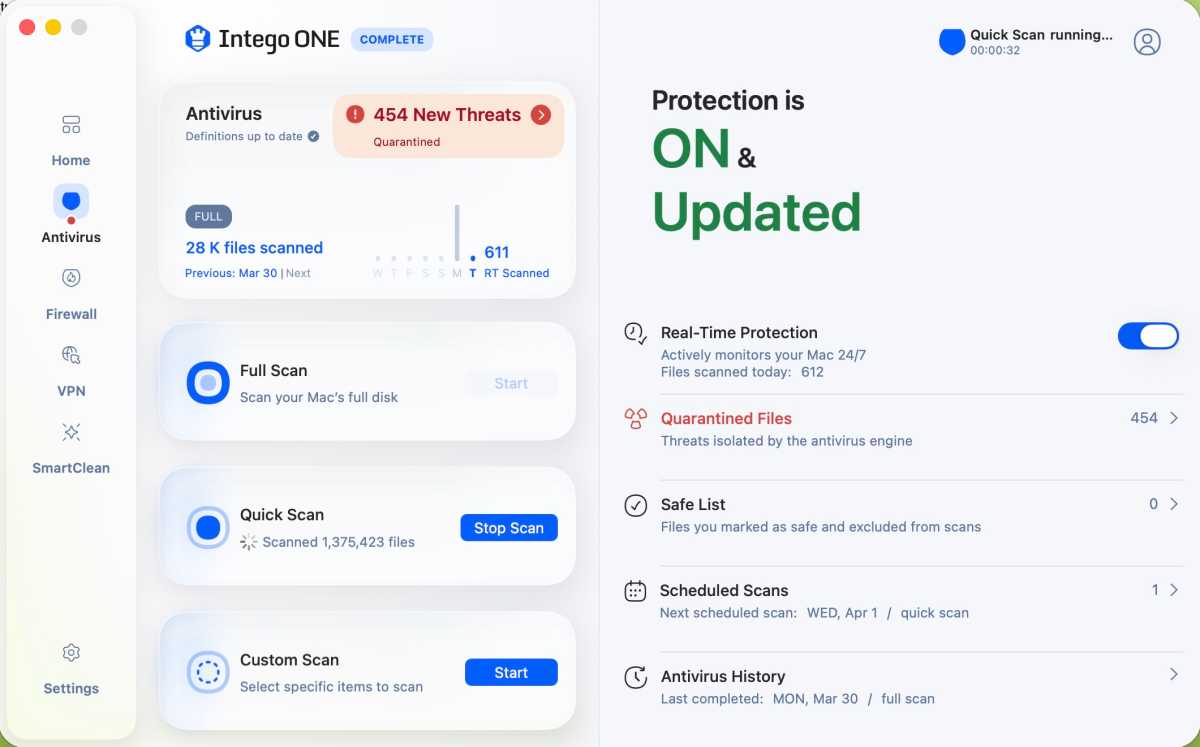
An Intego ONE Complete Quick Scan in progress.
Foundry
Perhaps the strongest feature of the package, Intego ONE’s antivirus module took just about everything I threw at it from over 130 viral samples from the Objective-See malware collection and came out smiling.
Scan performance improved dramatically with version 1.2.3 (compared to our initial tests of the Release Candidate), with the software processing more than two million files in roughly eight minutes in testing – placing it among the fastest options currently available for macOS.
The software, which offers Full Scan, Quick Scan, and Custom Scan options, dovetailed in perfectly with the Xprotect/Gatekeeper tools found in macOS Tahoe 26.4, issued warnings, and prevented malware and ransomware from being installed on all fronts.
Intego ONE quickly plowed through and removed more than 200 quarantined files, but left three behind.
Foundry
What few exceptions did get through via developer tools such as Xcode or Visual Code were caught moments later, and where I thought a fake copy of the Transmission BitTorrent client had gotten through, Intego ONE flagged it and quickly removed it via quarantine. Even fake Flash Player applications, which have long been the bane of antivirus utilities, were stopped immediately, and the software came through with flying colors while also scanning my MacBook Pro’s SSD, complete with more than 877GB of data, in under 10 minutes.
Other nifty features from the Antivirus module included a Custom Scan feature, which was well-implemented and included targeted scanning as well as an excellent auto-scan feature in which a test flash drive with malware on it was quickly scanned and its suspect files quarantined. A handy scheduling feature worked like a charm, and it’s easy to configure a set daily, weekly, or monthly scan as needed.
Firewall: How much control does the firewall actually give you?
Quickly editing a Firewall function and assigning an application to a function.Foundry
Intego ONE’s firewall feature may not be as customizable as a systems administrator might like, but what’s present is on point, complete with readily accessible configuration options that allow for a network connection and allow it to be denied or edited on the fly.
One of the first things you’ll notice after installing the software is how active the firewall itself is, reminding you of network connections as they emerge and asking whether you approve them or if they might be suspicious.
New rules can be created on the fly, and easy scripting allows you to activate applications on your Mac to deal with them as well as add a network port. A list of currently approved networks is available, and you can see which servers your Mac is trying to talk to and get a bead on your overall network traffic.
VPN: Is the built-in VPN good enough to use daily?
With the Intego ONE Complete plan you can take advantage of a VPN. This VPN may not be as robust as a dedicated VPN app, but what’s present is robust and has a good level of customization. Just click into the module from the home screen, activate the VPN, and it’s easy to geolocate to one of 51 servers around the world, as well as choose favorites.
Interestingly, the VPN module offers a choice between your preferred VPN module, wherein you can choose between Lightway – UPD, which is optimized for speed, and Lightway – TCP, which is optimized for reliability. Where performance itself was concerned, the bandwidth proved excellent, and the frame rates and audio sync on streaming content proved excellent.
Intego ONE Complete also extends VPN protection to the iPhone, although the iOS app has fewer configuration options than its Mac counterpart. Here’s how it performed in our tests.
What does Intego ONE for iPhone do?
VPN location selection and Security assessment
Foundry
Intego ONE for iOS is a mobile companion to Intego ONE Complete for Mac, combining a VPN with a selection of security and privacy checks. It doesn’t offer the full antivirus and firewall protection found in the Mac version, but it provides useful tools for keeping your iPhone’s internet connection private and checking important security settings.
The app requires iOS 18.2 or later and is available through the App Store. Installation is straightforward: download the app, sign in to your Intego account, and allow it to create a VPN configuration. Once that’s done, you’re ready to use the VPN and security tools.
Is the VPN any good on iPhone?
The VPN client makes it easy to switch between international servers and create a favorites list for locations you use regularly. Connections and disconnections are quick, and the app performed well in our tests over both Wi-Fi and cellular connections.
One limitation is that the iPhone app currently supports only the WireGuard VPN protocol. This gives users fewer configuration options than the Mac version, although it shouldn’t be an issue for most people who just want a simple VPN connection.
We tested Intego ONE on an iPhone 17 running iOS 27.0.1, using both Wi-Fi and AT&T’s 5G network. Tests were conducted with Ookla’s Speedtest.net app and Intego’s built-in speed test tool.
On Wi-Fi, our download speed averaged 84.1Mbps without a VPN, dropping to 71.9Mbps when connected to a Canadian server and 71.3Mbps with a New York server. That’s a reduction of around 15%, leaving plenty of bandwidth for streaming and other everyday activities.
The impact was greater over cellular. Our average download speed fell from 289.4Mbps without a VPN to 179.2Mbps through Canada and 174.8Mbps through New York, a reduction of approximately 38% to 40%. Nevertheless, these speeds remained more than adequate for streaming and large file transfers.
Intego’s built-in speed test reported average download speeds of 70.3Mbps over Wi-Fi and 139Mbps over cellular.
Streaming worked smoothly during testing, with good video quality, and the iPhone maintained a reasonable temperature even when streaming on battery power.
What security features does Intego ONE offer on iPhone?
Beyond its VPN, Intego ONE provides a useful security checkup. It can remind you to review whether important iPhone protections are enabled, including Face ID, your passcode, and the latest iOS updates.
The app also checks settings relating to ad tracking, detects whether screen recording is active, and looks for signs of jailbreaking, which can weaken Apple’s built-in security protections.
Intego ONE can also check the security of the Wi-Fi network your iPhone is connected to. The check takes around 10 seconds and identifies potential security issues, including whether the network uses strong encryption. It also reports connection speed, which can be useful when connecting to unfamiliar networks in hotels, cafés, or airports.
These tools are helpful reminders, particularly if you don’t regularly review your iPhone’s security and privacy settings. However, they don’t replace active threat protection. Intego ONE for iOS won’t prevent you from visiting a malicious website or clicking a phishing link, and it doesn’t provide the traditional antivirus and malware-scanning capabilities found in Intego ONE for Mac.
Is Intego ONE for iPhone worth using?
Intego ONE for iPhone is a useful addition to the Complete package. Its VPN is easy to configure, switching servers is straightforward, and performance was good enough for everyday use, including streaming.
It’s less suitable for users who want the extensive customization offered by dedicated VPN services, including more protocol choices and an internet kill switch. The security checks are useful, but they’re reminders to review your settings rather than comprehensive protection against online threats.
If you’re already subscribing to Intego ONE Complete for your Mac, the iPhone app is a worthwhile extra. It provides an easy way to use a VPN on the go while encouraging better security habits, without needing to learn another complicated security app.
For more on VPNs read our group test of the best VPNs for iPhone and iPad.
SmartClean: Is SmartClean a good Mac cleaner?
The SmartClean module is included with the Intego ONE Advanced and Intego ONE Complete plans. It’s a tool for disk optimization and offers several functions to manage CPU usage, RAM usage, a Disk Space Monitor, an App Uninstaller, and Optimization history.
Each function works well, and the overall SmartClean Optimization Scan was able to locate 111GB of large files on my Mac that could be removed, as well as 500MB of cache and log files. It is a good way to claw back some drive space without decimating your larger work files.
This disk cleanup can be extended in the settings to also include old downloads and old trash files, which is a nice option.
The Uninstaller function worked well and cleanly removed several extraneous applications I had on my SSD, but an attempt to remove a copy of DaVinci Resolve during a test run had to be repeated. This is one of a few bugs that cropped up in our testing of the Release Candidate, so we raised these issue with Intego and will be verifying that it has been addressed in the final version of the software.
What is missing?
Parental controls and spam/phishing protection would be good to see in a future update.
What issues and bugs did we encounter?
Quarantining suspect files in Intego ONE.Foundry
While Intego ONE Complete is generally excellent and its component functions shine, there are still a few quirks and interface limitations to note, though several earlier issues identified in our initial review have been resolved.
The application no longer repeatedly prompts for the system password during quarantine or malware removal, which was a major annoyance in earlier builds. Performance during large-scale cleanup has also improved considerably, with better system load distribution preventing the Mac from slowing to a crawl.
During testing, the software successfully processed and removed more than 200 quarantined files quickly, though a small number of files (three in our case) remained and required additional attention.
The user interface, while generally friendly, still lacks the ability to resize or expand to full screen, which feels like an unnecessary limitation.
A previous issue involving the application resetting permissions and requiring reinstallation did not reoccur in this version, suggesting it may have been resolved.
Pricing: Is Intego ONE good value?
Intego ONE Essential starts $2.50/£1.87 a month for one device for the first year, after that first year it will default to the full price of $3.33/£2.50 a month. That’s $29.99/£22.49 for the first year and then $39.99/£29.99 a year. You can choose a two year plan to keep paying the lower price for longer.
Get the best Intego ONE deal here
Intego ONE Advanced (with the Mac cleaner) is currently $52.49/£38.49 for the first year, and Intego ONE Complete (with the VPN) is $67.49/£45.49 for the first year. There are plans for one, three or five devices.
Intego ONE Complete also includes the iPhone app, with plans covering one Mac and one iPhone, three Macs and three iPhones, or five Macs and five iPhones. The iPhone app includes VPN access, network speed tests, and security checks, but not the Mac version’s antivirus and firewall features.
In comparison to Intego’s Mac Internet Security X9, which though available for $24.99/£20.99 for the first year, rose to $49.99/£49.99 a year afterwards, the new pricing structure is better for the long-term. The price is also very favourable compared to alternatives we include in our round up of the Best Antivirus software for Mac users.
Foundry
Should you buy Intego ONE?
Intego ONE proves to be an easy recommendation if you’re looking for strong malware protection and advanced firewall control on your Mac, and this is where the application shines.
Recent updates have addressed several early bugs and significantly improved performance, making Intego ONE a more compelling option than at launch.
The addition of an iPhone app makes the Complete package more appealing if you want protection for both your Mac and iPhone. While the iOS app doesn’t offer the same antivirus capabilities as the Mac version, its straightforward VPN delivered good performance in our tests, and the security checks provide useful reminders. It’s a worthwhile addition rather than a reason to subscribe on its own.
Where core protection is concerned, this is one of the best options available for your Mac, and this, combined with Intego’s 30-day money-back guarantee, makes it well worth a trial run.

Intego ONE offers superb malware detection, excellent firewall controls, and impressively fast scan times, even across millions of files. Recent updates have improved performance during cleanup and resolved several frustrating bugs. It still lacks features such as spam and phishing prevention, and a few interface limitations remain, but it’s a strong choice for Mac users who want reliable malware protection and excellent network control at a good price. The Complete plan also includes an iPhone app with a straightforward VPN and useful security checks, although it lacks some advanced features found in dedicated VPN apps.
Price When Reviewed
This value will show the geolocated pricing text for product undefined
Best Pricing Today
Intego
$29.99
Who it’s best for: Mac users who want strong, reliable malware protection with advanced control over network activity should seriously consider Intego ONE Complete. It’s especially suited to users who prioritize security performance over having an all-in-one feature set.
Who it’s not for: It’s missing key features you’d expect at this price, like phishing protection and parental controls, so if you need those features look elsewhere.
At a glance
Protection: ★★★★★
Performance: ★★★★★
Features: ★★★★☆
Ease of use: ★★★★★
Value: ★★★★☆
Intego ONE is Intego’s new antivirus and anti-malware package, replacing Internet Security X9. We have long recommended its predecessor as the best antivirus utility for Mac users, thanks to its excellent malware detection, strong ransomware protection, and tools designed specifically for macOS. Intego ONE improves on it in several respects.
There are three plans available, with options covering one, three, or five Macs. Intego ONE Complete also includes an iPhone for each Mac covered by the subscription.
We tested Intego ONE Complete, including its Antivirus, Firewall, VPN, and SmartClean modules, as well as the companion iPhone app. Each Mac module has its own features and customization options, while the iPhone app provides additional VPN and security tools.
Intego ONE requires macOS 12.4 Monterey or later and is easy to set up. Like previous versions, it asks for full disk access and permission to create a network extension for firewall and filtering functions.
Antivirus: How good is Intego ONE Complete at detecting malware?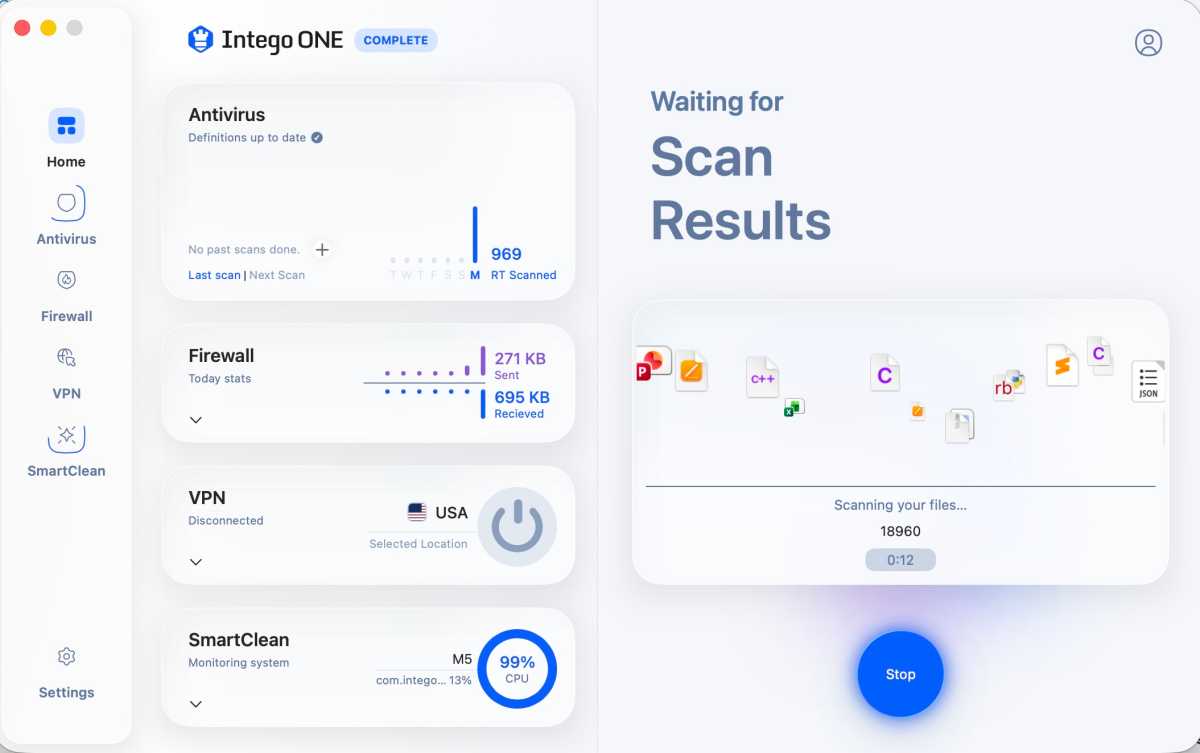
An Intego ONE Complete Quick Scan in progress
.Foundry
Perhaps the strongest feature of the package, Intego ONE’s antivirus module took just about everything I threw at it from over 130 viral samples from the Objective-See malware collection and came out smiling.
Scan performance improved dramatically with version 1.2.3 (compared to our initial tests of the Release Candidate), with the software processing more than two million files in roughly eight minutes in testing – placing it among the fastest options currently available for macOS.
The software, which offers Full Scan, Quick Scan, and Custom Scan options, dovetailed in perfectly with the Xprotect/Gatekeeper tools found in macOS Tahoe 26.4, issued warnings, and prevented malware and ransomware from being installed on all fronts.
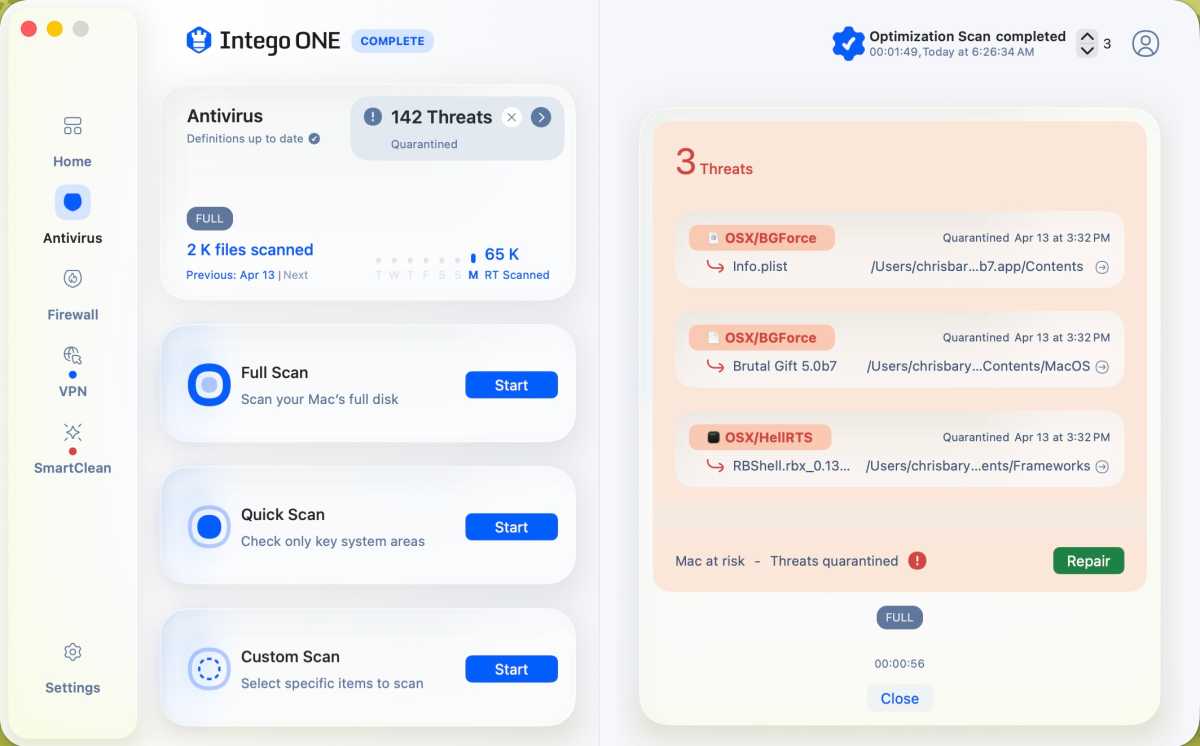
Intego ONE quickly plowed through and removed more than 200 quarantined files, but left three behind.
Foundry
What few exceptions did get through via developer tools such as Xcode or Visual Code were caught moments later, and where I thought a fake copy of the Transmission BitTorrent client had gotten through, Intego ONE flagged it and quickly removed it via quarantine. Even fake Flash Player applications, which have long been the bane of antivirus utilities, were stopped immediately, and the software came through with flying colors while also scanning my MacBook Pro’s SSD, complete with more than 877GB of data, in under 10 minutes.
Other nifty features from the Antivirus module included a Custom Scan feature, which was well-implemented and included targeted scanning as well as an excellent auto-scan feature in which a test flash drive with malware on it was quickly scanned and its suspect files quarantined. A handy scheduling feature worked like a charm, and it’s easy to configure a set daily, weekly, or monthly scan as needed.
Firewall: How much control does the firewall actually give you?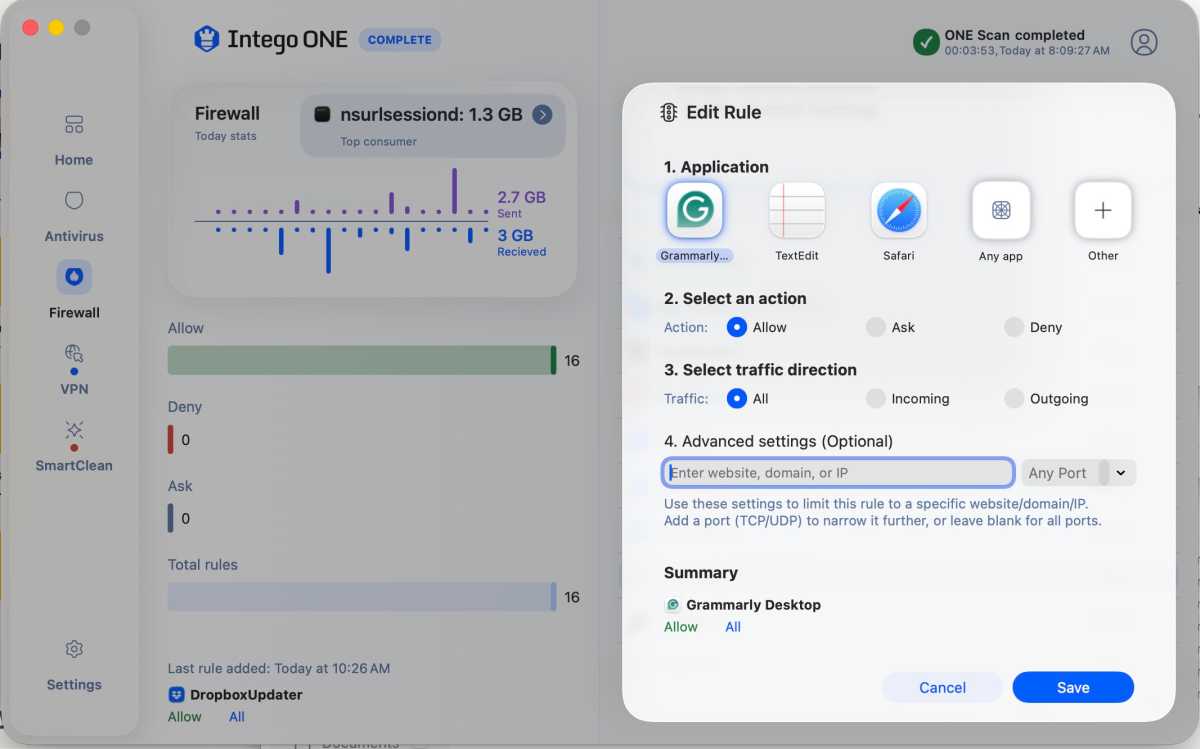
Quickly editing a Firewall function and assigning an application to a function.
Foundry
Intego ONE’s firewall feature may not be as customizable as a systems administrator might like, but what’s present is on point, complete with readily accessible configuration options that allow for a network connection and allow it to be denied or edited on the fly.
One of the first things you’ll notice after installing the software is how active the firewall itself is, reminding you of network connections as they emerge and asking whether you approve them or if they might be suspicious.
New rules can be created on the fly, and easy scripting allows you to activate applications on your Mac to deal with them as well as add a network port. A list of currently approved networks is available, and you can see which servers your Mac is trying to talk to and get a bead on your overall network traffic.
With the Intego ONE Complete plan you can take advantage of a VPN. This VPN may not be as robust as a dedicated VPN app, but what’s present is robust and has a good level of customization. Just click into the module from the home screen, activate the VPN, and it’s easy to geolocate to one of 51 servers around the world, as well as choose favorites.
Interestingly, the VPN module offers a choice between your preferred VPN module, wherein you can choose between Lightway – UPD, which is optimized for speed, and Lightway – TCP, which is optimized for reliability. Where performance itself was concerned, the bandwidth proved excellent, and the frame rates and audio sync on streaming content proved excellent.
Intego ONE Complete also extends VPN protection to the iPhone, although the iOS app has fewer configuration options than its Mac counterpart. Here’s how it performed in our tests.
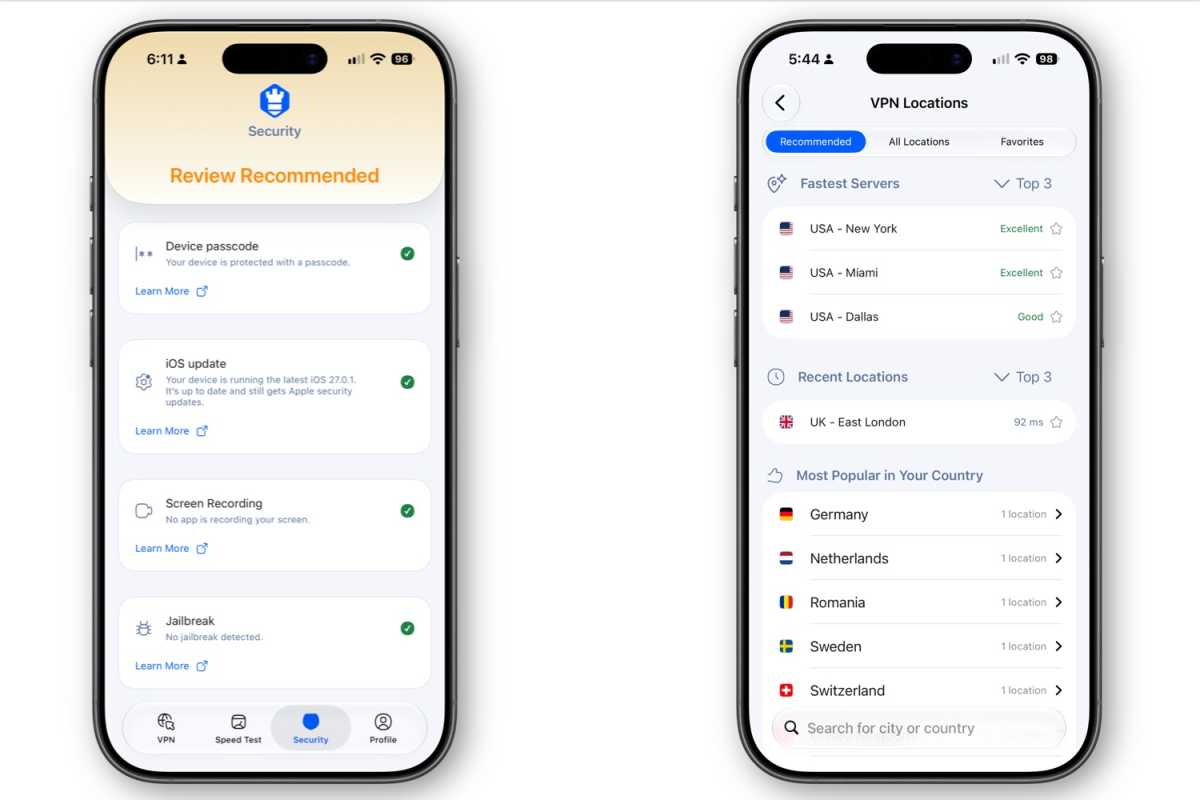
VPN location selection and Security assessment
Foundry
Intego ONE for iOS is a mobile companion to Intego ONE Complete for Mac, combining a VPN with a selection of security and privacy checks. It doesn’t offer the full antivirus and firewall protection found in the Mac version, but it provides useful tools for keeping your iPhone’s internet connection private and checking important security settings.
The app requires iOS 18.2 or later and is available through the App Store. Installation is straightforward: download the app, sign in to your Intego account, and allow it to create a VPN configuration. Once that’s done, you’re ready to use the VPN and security tools.
Is the VPN any good on iPhone?The VPN client makes it easy to switch between international servers and create a favorites list for locations you use regularly. Connections and disconnections are quick, and the app performed well in our tests over both Wi-Fi and cellular connections.
One limitation is that the iPhone app currently supports only the WireGuard VPN protocol. This gives users fewer configuration options than the Mac version, although it shouldn’t be an issue for most people who just want a simple VPN connection.
We tested Intego ONE on an iPhone 17 running iOS 27.0.1, using both Wi-Fi and AT&T’s 5G network. Tests were conducted with Ookla’s Speedtest.net app and Intego’s built-in speed test tool.
On Wi-Fi, our download speed averaged 84.1Mbps without a VPN, dropping to 71.9Mbps when connected to a Canadian server and 71.3Mbps with a New York server. That’s a reduction of around 15%, leaving plenty of bandwidth for streaming and other everyday activities.
The impact was greater over cellular. Our average download speed fell from 289.4Mbps without a VPN to 179.2Mbps through Canada and 174.8Mbps through New York, a reduction of approximately 38% to 40%. Nevertheless, these speeds remained more than adequate for streaming and large file transfers.
Intego’s built-in speed test reported average download speeds of 70.3Mbps over Wi-Fi and 139Mbps over cellular.
Streaming worked smoothly during testing, with good video quality, and the iPhone maintained a reasonable temperature even when streaming on battery power.
What security features does Intego ONE offer on iPhone?Beyond its VPN, Intego ONE provides a useful security checkup. It can remind you to review whether important iPhone protections are enabled, including Face ID, your passcode, and the latest iOS updates.
The app also checks settings relating to ad tracking, detects whether screen recording is active, and looks for signs of jailbreaking, which can weaken Apple’s built-in security protections.
Intego ONE can also check the security of the Wi-Fi network your iPhone is connected to. The check takes around 10 seconds and identifies potential security issues, including whether the network uses strong encryption. It also reports connection speed, which can be useful when connecting to unfamiliar networks in hotels, cafés, or airports.
These tools are helpful reminders, particularly if you don’t regularly review your iPhone’s security and privacy settings. However, they don’t replace active threat protection. Intego ONE for iOS won’t prevent you from visiting a malicious website or clicking a phishing link, and it doesn’t provide the traditional antivirus and malware-scanning capabilities found in Intego ONE for Mac.
Is Intego ONE for iPhone worth using?Intego ONE for iPhone is a useful addition to the Complete package. Its VPN is easy to configure, switching servers is straightforward, and performance was good enough for everyday use, including streaming.
It’s less suitable for users who want the extensive customization offered by dedicated VPN services, including more protocol choices and an internet kill switch. The security checks are useful, but they’re reminders to review your settings rather than comprehensive protection against online threats.
If you’re already subscribing to Intego ONE Complete for your Mac, the iPhone app is a worthwhile extra. It provides an easy way to use a VPN on the go while encouraging better security habits, without needing to learn another complicated security app.
For more on VPNs read our group test of the best VPNs for iPhone and iPad.
The SmartClean module is included with the Intego ONE Advanced and Intego ONE Complete plans. It’s a tool for disk optimization and offers several functions to manage CPU usage, RAM usage, a Disk Space Monitor, an App Uninstaller, and Optimization history.
Each function works well, and the overall SmartClean Optimization Scan was able to locate 111GB of large files on my Mac that could be removed, as well as 500MB of cache and log files. It is a good way to claw back some drive space without decimating your larger work files.
This disk cleanup can be extended in the settings to also include old downloads and old trash files, which is a nice option.
The Uninstaller function worked well and cleanly removed several extraneous applications I had on my SSD, but an attempt to remove a copy of DaVinci Resolve during a test run had to be repeated. This is one of a few bugs that cropped up in our testing of the Release Candidate, so we raised these issue with Intego and will be verifying that it has been addressed in the final version of the software.
What is missing?Parental controls and spam/phishing protection would be good to see in a future update.
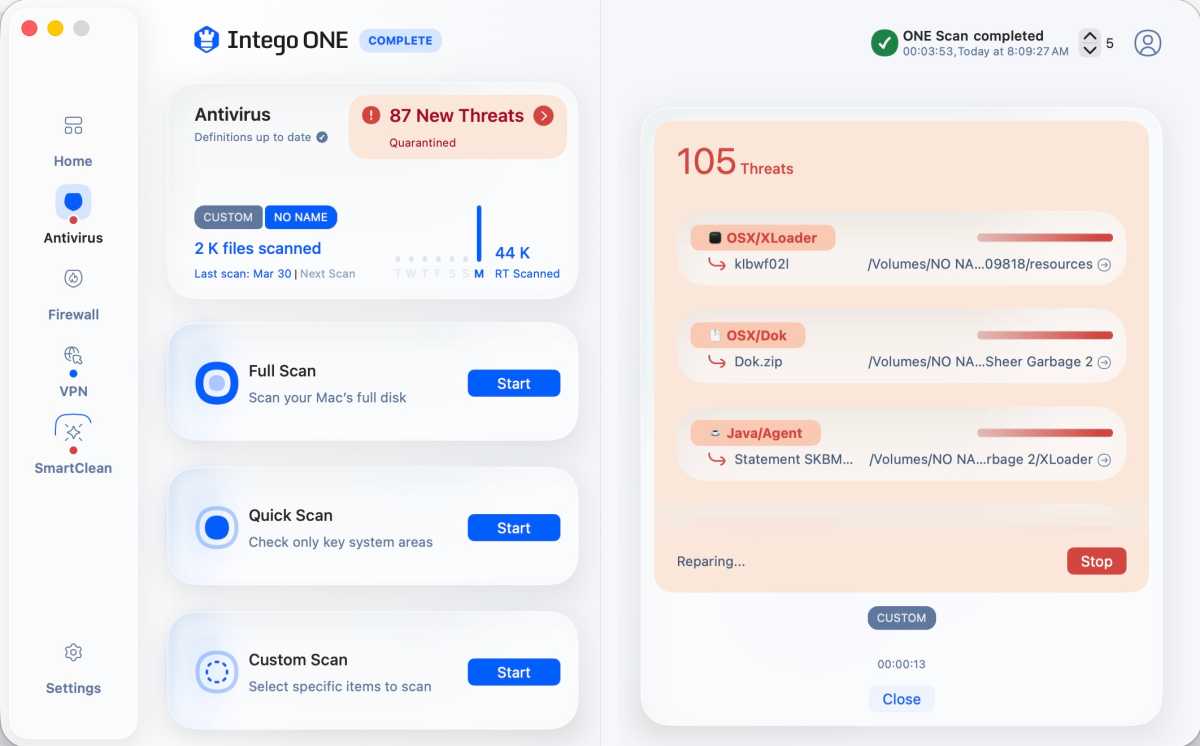
Quarantining suspect files in Intego ONE.
Foundry
While Intego ONE Complete is generally excellent and its component functions shine, there are still a few quirks and interface limitations to note, though several earlier issues identified in our initial review have been resolved.
The application no longer repeatedly prompts for the system password during quarantine or malware removal, which was a major annoyance in earlier builds. Performance during large-scale cleanup has also improved considerably, with better system load distribution preventing the Mac from slowing to a crawl.
During testing, the software successfully processed and removed more than 200 quarantined files quickly, though a small number of files (three in our case) remained and required additional attention.
The user interface, while generally friendly, still lacks the ability to resize or expand to full screen, which feels like an unnecessary limitation.
A previous issue involving the application resetting permissions and requiring reinstallation did not reoccur in this version, suggesting it may have been resolved.
Intego ONE Essential starts $2.50/£1.87 a month for one device for the first year, after that first year it will default to the full price of $3.33/£2.50 a month. That’s $29.99/£22.49 for the first year and then $39.99/£29.99 a year. You can choose a two year plan to keep paying the lower price for longer.
Get the best Intego ONE deal here
Intego ONE Advanced (with the Mac cleaner) is currently $52.49/£38.49 for the first year, and Intego ONE Complete (with the VPN) is $67.49/£45.49 for the first year. There are plans for one, three or five devices.
Intego ONE Complete also includes the iPhone app, with plans covering one Mac and one iPhone, three Macs and three iPhones, or five Macs and five iPhones. The iPhone app includes VPN access, network speed tests, and security checks, but not the Mac version’s antivirus and firewall features.
In comparison to Intego’s Mac Internet Security X9, which though available for $24.99/£20.99 for the first year, rose to $49.99/£49.99 a year afterwards, the new pricing structure is better for the long-term. The price is also very favourable compared to alternatives we include in our round up of the Best Antivirus software for Mac users.
Foundry
Intego ONE proves to be an easy recommendation if you’re looking for strong malware protection and advanced firewall control on your Mac, and this is where the application shines.
Recent updates have addressed several early bugs and significantly improved performance, making Intego ONE a more compelling option than at launch.
The addition of an iPhone app makes the Complete package more appealing if you want protection for both your Mac and iPhone. While the iOS app doesn’t offer the same antivirus capabilities as the Mac version, its straightforward VPN delivered good performance in our tests, and the security checks provide useful reminders. It’s a worthwhile addition rather than a reason to subscribe on its own.
Where core protection is concerned, this is one of the best options available for your Mac, and this, combined with Intego’s 30-day money-back guarantee, makes it well worth a trial run.
Intego
$29.99
| # | Наименование новости | Тональность | Информативность | Дата публикации |
|---|---|---|---|---|
| 1 | Malwarebytes Anti-Malware 5.7.2.358 | 0 | 38.83 | 02-10-2026 |
| 2 | VPNs aren’t enough anymore. GhostShield adds real-time AI threat protection. | 0 | 24.69 | 29-09-2026 |
| 3 | This $199.90 iOS scanner app is only $25 for 2 days | 0 | 14.27 | 09-10-2026 |
| 4 | DarkSword and Coruna iOS exploits continue to attack crypto wallets | 0 | 12.38 | 09-10-2026 |
| 5 | Moonlock Review: MacPaw’s Dedicated macOS Antivirus and Privacy Tool | 0 | 10.07 | 08-10-2026 |
| 6 | Best Prime Day Apple deals: Save on iPad, AirPods, Macs & Apple Watch | 0 | 22.12 | 07-10-2026 |
| 7 | Fort Firewall 3.20.1 | 0 | 17.8 | 05-10-2026 |
| 8 | High Mac prices got you down? These Amazon deals offer major relief | 0 | 12.1 | 07-10-2026 |
| 9 | Esta es la app profesional que uso para eliminar aplicaciones molestas y para tomar el control de Android | 0 | 18.28 | 23-08-2026 |